

How to withdraw money from Payoneer in Ukraine - methods and fees


Do you work on UpWork, Patreon or Envato? Then you have probably wondered how to withdraw money from Payoneer in Ukraine with minimal fees and without complicated banking schemes. This is exactly where Payoneer becomes a real lifesaver for Ukrainian freelancers and sole proprietors working with international clients. Payoneer remains the main financial hub for Ukrainian freelancers and IT entrepreneurs.
But first, the thing reviews leave out. Payoneer rules follow who the account belongs to, not your passport. For a Ukrainian sole proprietor and for a US company owned by someone living in Ukraine these are two different sets of fees and limits. We cover both below.
| What exactly | Ukrainian account (individual or sole proprietor) | US company (LLC) |
|---|---|---|
| Receiving USD to account details | 1%: the dollar is not a local currency for a Ukrainian account | free: USD is the local currency |
| Withdrawing to your own account in Ukraine | yes, to a sole proprietor account by IBAN | not directly, the payee name must match the company name |
| Receiving from an individual client | declined | declined |
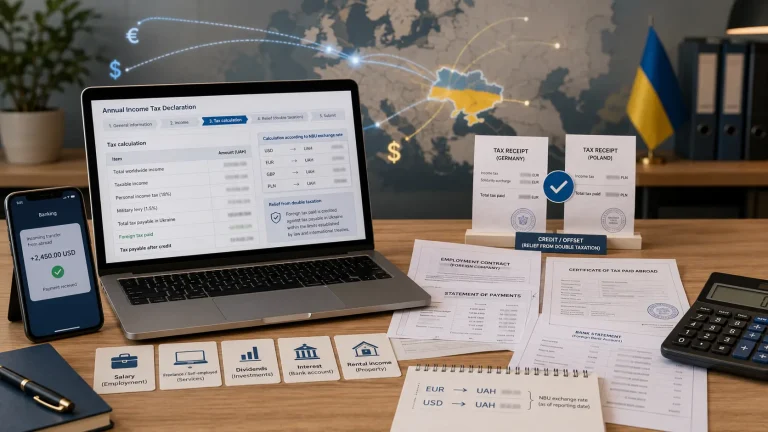
| Taxes | 5% single tax + 1% military levy + social contributions | CFC reporting in Ukraine + Form 5472 in the US |
In this article we cover how to withdraw money from Payoneer in Ukraine, what the fees are in 2026, how an account for a US company differs, and how to report the income correctly.
What is Payoneer and how to withdraw money from Payoneer in Ukraine
In short: Payoneer is an international payment platform that provides you with virtual banking details in the USA, EU, United Kingdom and other regions. The company buh.ua is a Payoneer partner in Ukraine and has prepared a detailed guide on setting up an account and receiving international payments using the Payoneer service.
For a foreign client, you look like a local contractor who can receive payments to a domestic account. For you - it is a convenient wallet from which funds instantly “fly” into Ukrainian banks.
Payoneer is especially popular among sole proprietors in Ukraine who receive income from foreign clients, marketplaces and freelance platforms, because it allows them to legally confirm incoming funds for tax accounting.
Why is this better than a regular SWIFT transfer?
- Direct integration with global platforms: Payoneer is an official partner of Upwork, with the partnership extended for another 15 years. Payouts from major platforms arrive faster and with lower fees than SWIFT.
- Multi-currency support: The system officially supports more than 70 currencies and operates in over 190 countries worldwide. You can hold balances in USD, EUR, GBP, CAD and AUD at the same time.
- Legal for sole proprietors: A Payoneer statement and invoice are assessed by the bank within its currency supervision and AML procedures. No rule obliges a bank to accept them, but this is the standard package you will be asked for.
- Local support: Ukrainian-language support allows users to resolve verification issues or blocked payments without needing a translator.
Who this service is perfect for:
- IT specialists and freelancers (Upwork, Freelancer, Toptal).
- Designers and artists (99designs, Envato, Shutterstock, Etsy).
- Content creators (Patreon, YouTube, BuyMeACoffee).
- E-commerce entrepreneurs who sell on Amazon or eBay.
Payoneer fees and what withdrawing money in Ukraine costs
Before planning a withdrawal it helps to understand the fee structure. It is flexible but confusing. The rule of thumb is that the more convenient it is for the client to pay, the higher the fee for you.
What it costs to receive money
| Receiving method | Fee per the Payoneer pricing page | Comment |
|---|---|---|
| From marketplaces (Upwork, Amazon and so on) | varies by marketplace | Payoneer does not publish a single figure, check the terms of the specific platform. |
| From another Payoneer customer | free for the recipient | The sender pays - up to $4.00 within the same country and up to 1% plus up to $4.00 cross-border. The claim of "$3.00 or 0.6% since October 2025" is not supported by the pricing page. |
| Direct card payment (Request a Payment) | up to 3.99% + $0.49 | The fastest option, the client pays via a link. |
| Bank account details in USD, EUR, GBP | 1% (minimum $1) | For a Ukrainian account these are "not your local currency", so there is no zero option. ACH in the US and a bank transfer in the EU or UK are also 1%. |
And this is exactly where the fork is. For an account opened for a US company the dollar is the local currency, so receiving to USD details is free. The same payment from the same client costs 1% on a Ukrainian account and 0% on an American one.
What it costs to withdraw to Ukraine
| Destination | Fee | Speed |
|---|---|---|
| Monobank, direct integration | 2% - the integration rate | from 15 minutes to a day |
| PrivatBank, Privat24 | 1.5% per the bank's own page (previously 2%) | from a few hours to 1 business day |
| Other banks by IBAN | 1.2-4% per the global Payoneer pricing | 1-3 business days, sometimes longer |
There is no fixed "steady 2%" for all banks. Payoneer shows the exact amount before you confirm the transfer, and inside that percentage there is still the USD to UAH conversion rate.
Additional costs
- Annual account fee - $29.95. It applies only if the account receives less than $6,000 in any 12 consecutive months. Articles often quote a $2,000 threshold - it is out of date.
- Annual card fee - a separate $29.95. It is not the same as the account fee.
- ATM balance check or ATM decline - $1.00 ($0.80 or £0.65).
- Cash withdrawal - $3.15 (€2.50 or £1.95) plus up to 1.8% without conversion or up to 3.5% with conversion.
Payoneer pricing changes periodically. The figures here were checked against the official pricing page; see your account for the current version.
Do you want to consult with a specialist on how to withdraw money from Payoneer to a card in Ukraine?
Leave a request and our specialist will contact you shortly
The Payoneer card: fees, benefits and pitfalls
A Payoneer card, virtual or plastic, is not issued automatically. The condition is receiving at least $100 over the last 6 months, and the threshold depends on the country. In some countries cards are unavailable altogether because of licensing restrictions.
When the card pays off:
- Travel abroad - payments in the card currency carry no conversion fee.
- Paying for foreign services - Adobe, Google Ads, AWS, Zoom: no conversion if the service currency matches the card currency.
- Bookings - hotels and car rentals often require a foreign bank card.
Why it is a poor choice for everyday purchases in Ukraine:
- Double conversion - paying in hryvnia from a dollar card costs you up to 3.5% on the rate.
- Purchases without conversion cost up to 1.8%, and this is a separate rate rather than an add-on to the 3.5%. If the merchant country matches the card issuing country, there is no fee.
- Cash withdrawals - $3.15 per operation plus a percentage.
The Payoneer card is a tool for digital spending and travel. For living in Ukraine it is cheaper to withdraw to Monobank or PrivatBank and pay with an ordinary hryvnia card.
Payoneer account details - how to receive payments from foreign clients
Large clients in the US or EU often cannot pay "via a link", they need a bank account. Payoneer solves this with Receiving Accounts. You get details in USD (an account at a US bank), EUR, GBP, and also AUD, CAD and JPY.
How it works. You design something for a company in New York. Instead of an international SWIFT transfer you give them your US details from Payoneer. For the client that is an ordinary domestic ACH transfer, often free on their side.
A limit worth knowing before you start. A receiving account accepts only payments for business transactions from business accounts. Payoneer puts it plainly: "Payments from personal bank accounts will be declined". If your client is an individual paying from a personal account, the payment will not go through.
Important for sole proprietors. Using these details lets you work under a direct contract. A Ukrainian bank will accept the payment if you provide a Payoneer statement showing the account belongs to you, plus an invoice and a contract.
How to register Payoneer to withdraw money in Ukraine
The registration process is standard, but there is one point where beginners often fail.
Main rule: choose a Business Account
During registration the system will ask: Individual or Company/Business?

Individual
for personal needs
Business
for sole proprietors and legal entities
Why is this important? To legally withdraw foreign currency to a Ukrainian bank, the data in Payoneer (company name or the sole proprietor’s full name) must match 100% with the owner of the bank account. If you register a personal account but try to withdraw funds to a sole proprietor account - the bank may block the payment.
Step-by-step registration process:
Step 1. Registration → Go to Payoneer and click “Open an account” or “Sign up”. Enter your email, use a strong password and enable two-factor authentication.
Step 2. Enter personal data and business information → Enter your full name (in Latin letters, as in your passport), residential address and phone number. For sole proprietors, write your full name in the "Company Name" field.
Step 3. Link a bank account → After successful verification you can connect a Ukrainian bank to withdraw funds in UAH. The system will ask you to enter your IBAN (international bank account number).
Linking an IBAN is a technical requirement of the platform for profile verification, not a transfer of data to the tax office. Separately from that, automatic exchange under CRS applies, and it is better to know about it in advance - there is a section on it below. For more on Payoneer for sole proprietors, checks and risks, see our channel.
Where to find your IBAN? In Monobank open the section "Top up your card", then "By bank details" - there you will see the IBAN. In PrivatBank click the gear icon in the top right corner, select "Card details" and copy the number.
Important point: even if you plan to use only the Payoneer card and never withdraw money to a Ukrainian bank, you still need to provide a bank account during registration. This is a technical requirement of the platform. In the future you will simply use the card, and the account information will remain there "just in case".
Step 4. Verification → Submit documents confirming your identity and, if necessary, business documents. Payoneer usually checks documents within several hours up to 2-3 days.
During registration specify the same address that appears in your banking documents in Ukraine. This will speed up the verification process.
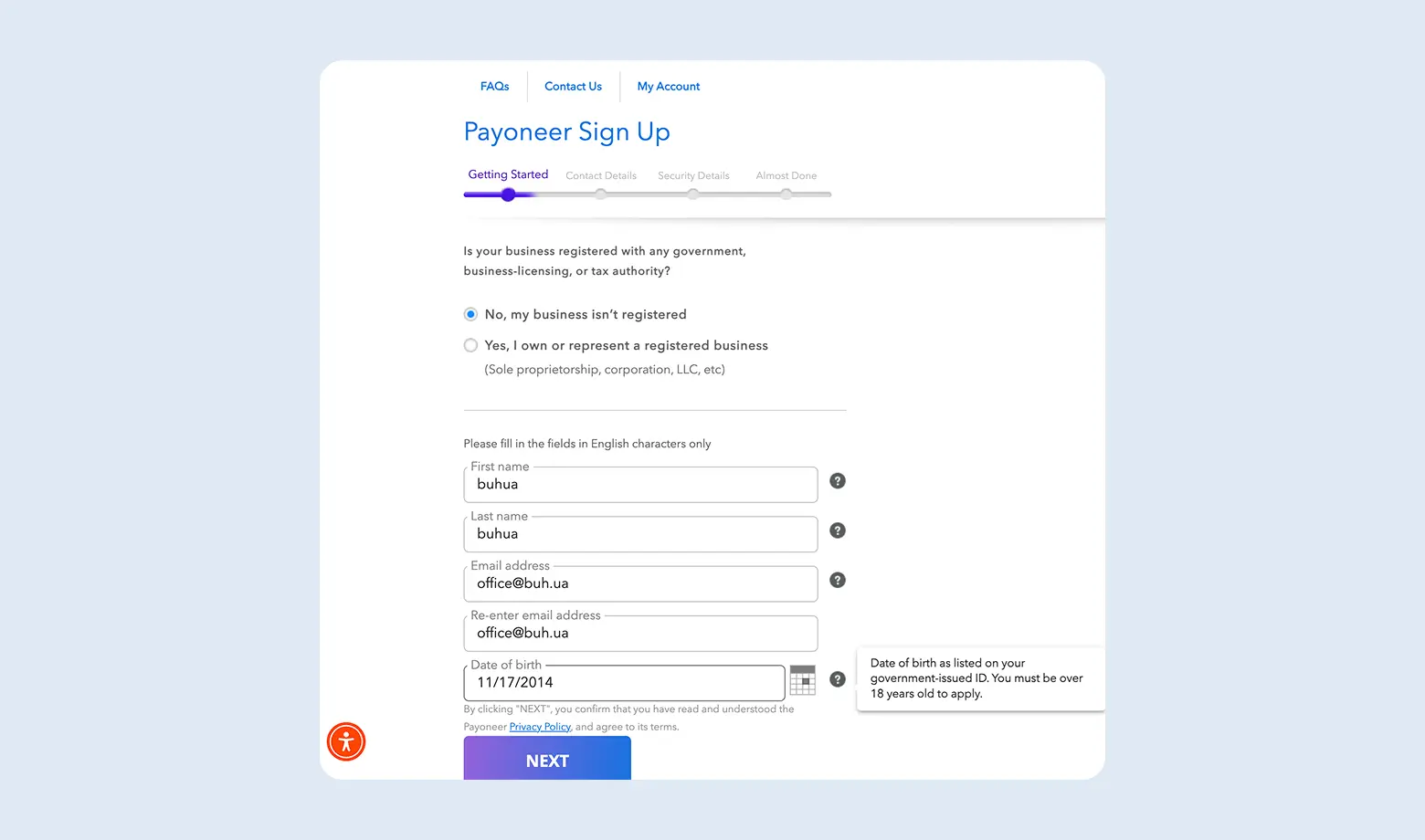
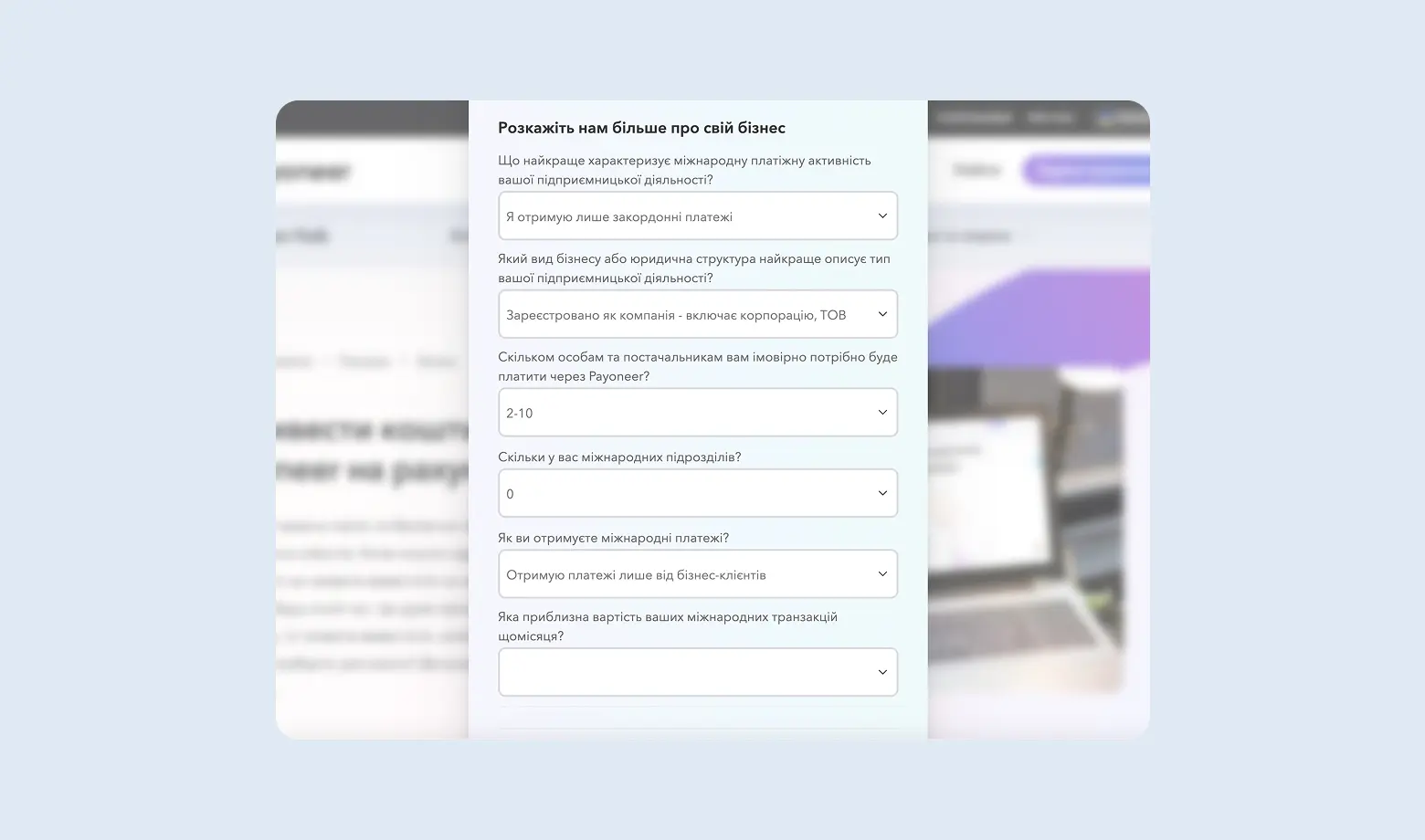
Important note: for beginners, a personal account linked to a sole proprietor is usually enough. However, if you plan to scale, work with large corporate payments or want to connect Stripe, the best solution is to open a corporate account for a legal entity.
You can register a company in the USA. This will not only allow you to get a full business profile in Payoneer but also open access to a wider range of global financial tools and a higher level of trust from foreign partners.
Scenario 2. Payoneer for a US company
If you have a company in the US while living in Ukraine, Payoneer works under different rules. This is not a workaround, it is a different account type - a company account for a US legal entity.
What improves
- Receiving USD is free. The dollar is the local currency for a US account, so the 1% receiving account fee does not apply.
- A full business profile. That is what you need to connect Stripe and to work with large corporate clients.
- More trust from foreign partners used to paying a local contractor.
Two limits that break the loop
First, withdrawals. Payoneer states plainly: "For Company accounts, the account holder name must match the company name on your Payoneer account". The payee name has to match the company name. So moving LLC money to a personal account or to the owner's sole proprietor account in Ukraine is not possible directly.
Second, incoming payments. A receiving account accepts only payments for business transactions from business accounts. A payment from an individual client will be declined.
How the loop closes. There is one working route - an account at a Ukrainian bank in the name of the LLC itself, through registering the non-resident with the tax authority (Article 64.5 of the Tax Code, form 1-OPN). Then the names match and the payment goes through. It is a separate procedure, and the one most often overlooked when a company is registered "to receive payments".
Taxes for a US company
Here there are two sets of obligations. In Ukraine an LLC with a single Ukrainian owner is a controlled foreign company under Article 39-2 of the Tax Code.
- Notice of acquiring a share - 60 days, form F1308001. The penalty for not filing is 300 subsistence minimums, that is UAH 998,400 per instance.
- CFC report - by 1 May, separately for each company including dormant and loss-making ones. Translating the financial statements into Ukrainian is not required.
- Rates: undistributed profit is 18% income tax plus 5% military levy, 23% in total. Dividends distributed before the report is filed are 9% plus 5%, 14% in total.
- Exemption - either the combined income of all CFCs stays under EUR 2 million, or there is a treaty with the US plus one of two conditions: an effective rate of at least 13% or a passive income share of no more than 50%. The second route is available to a US LLC.
There is a detailed breakdown in our separate article on CFC reporting.
- In the US, Form 5472 with a pro forma Form 1120 is filed annually by 15 April, even with no activity. The penalty is $25,000. E-filing is prohibited.
- BE-13 - within 45 days of forming the company, threshold $40 million, below which a Claim for Exemption is filed.
- BOI is no longer filed with FinCEN as of 14.08.2026.
The step-by-step view, from choosing a state to the EIN and the bank, is in our article on opening a company in the USA.
How to withdraw money from Payoneer in Ukraine
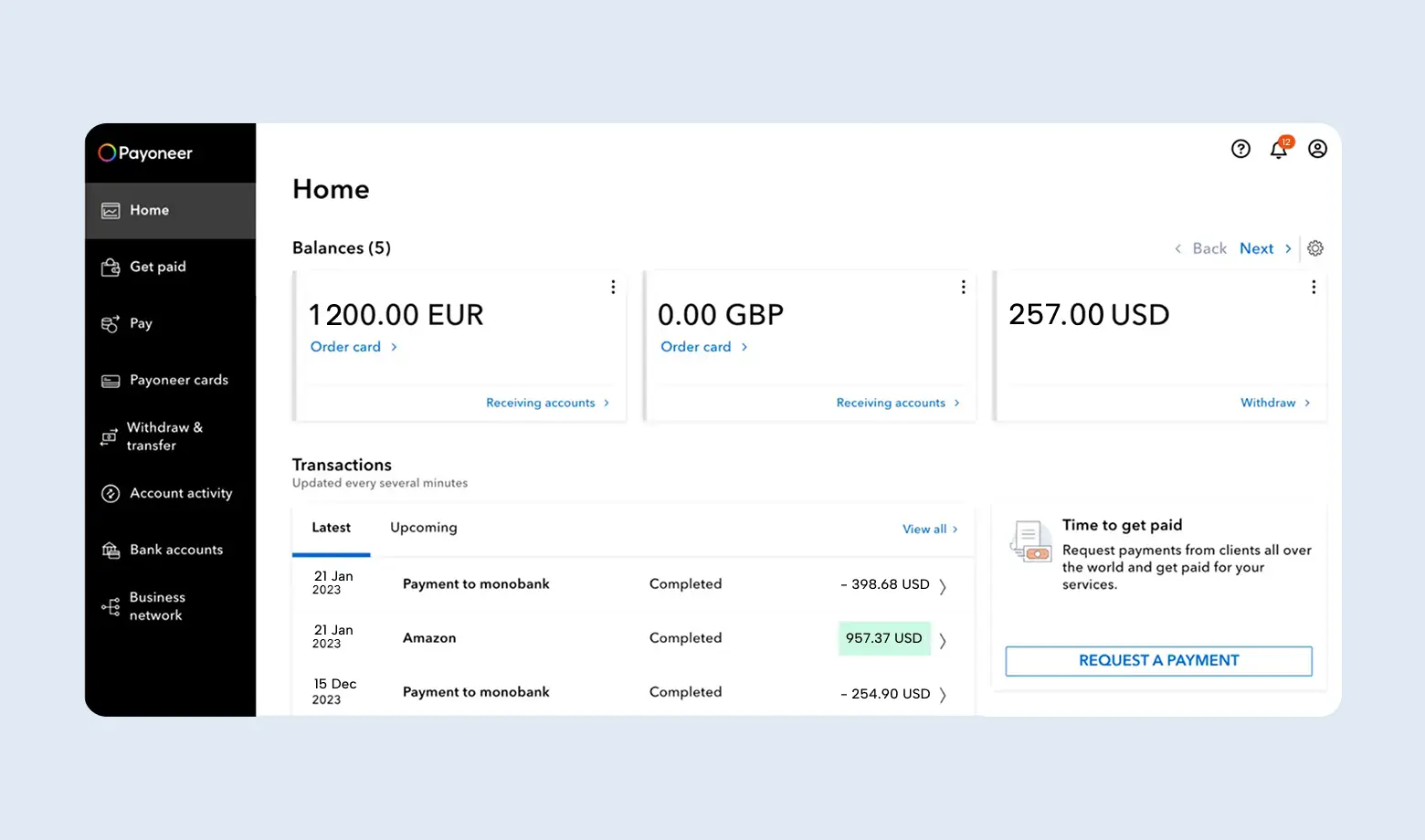
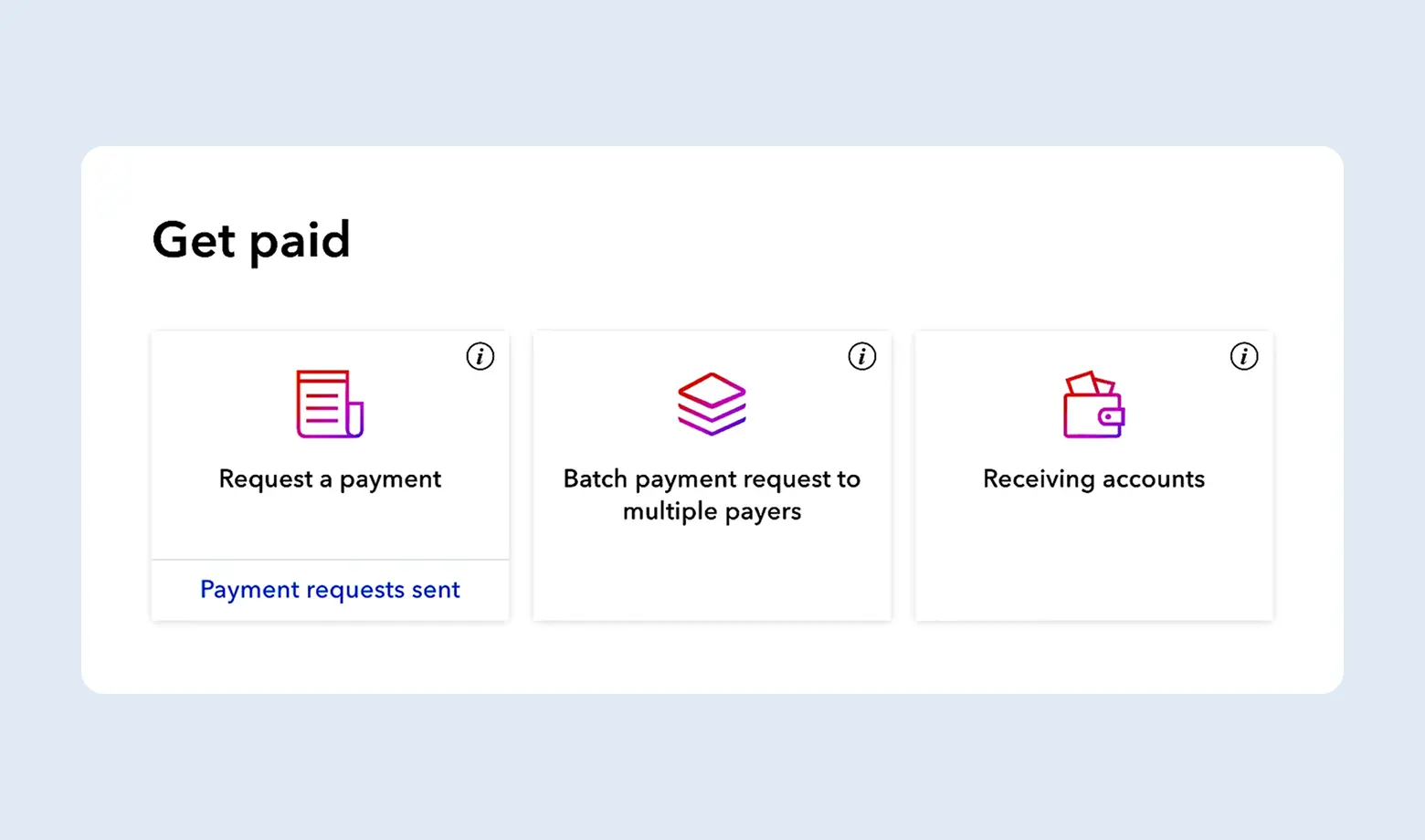
Once your account is ready, the main question appears - how to withdraw money from Payoneer in Ukraine to a card or bank account. In the Payoneer dashboard this is handled by the Get Paid and Withdraw sections.
- How to receive a payment from a client (Get Paid section)
Here the system offers three tools. Choose the one that fits your situation:
- Request a Payment: you create an invoice and send it to the client. They can pay it even with a regular bank card.
- Receiving Accounts: your virtual banking details. You copy them and insert them into payout settings on Upwork, Fiverr or send them to the client for a direct bank transfer.
- Batch Payment Request: if you have many clients at once - this tool allows you to create a group of payment requests at one time.
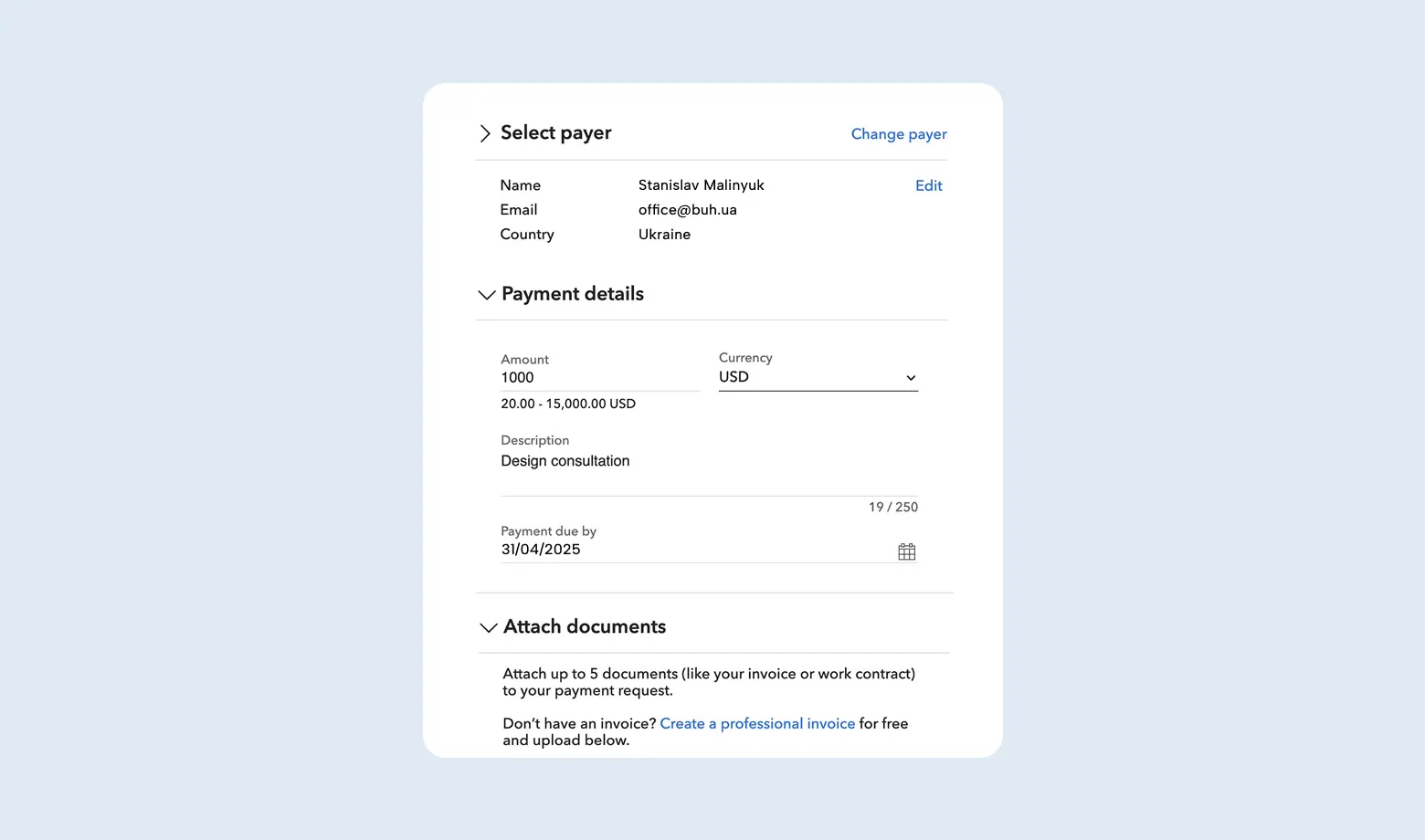
How to issue an invoice to a client (quick guide):
- In the menu on the left click Request a payment.
- Enter the client’s email and details.
- Enter the amount, currency and a detailed description of the service (for example "UI/UX Design for Mobile App").
- Add the invoice file and set the payment deadline.
- Click Send. The client will receive an email with a link and will be able to pay the invoice online.
How to withdraw money from Payoneer to a bank in Ukraine
If you do not use direct integration through Monobank or Privat24 apps (which we mentioned above), use the standard withdrawal through the website:
Step 1. In the menu open Withdraw → To Bank Account.
Step 2. Choose the balance you want to withdraw from (for example USD).
Step 3. Select the added bank account (IBAN of your sole proprietor account).
Note: the official minimum withdrawal is $50. Payoneer sets no upper limit, and PrivatBank quotes a $5 minimum for its own transfers.
Step 4. Click Review. The system will calculate the fee (1.2-4% per the pricing page, depending on the route) and show the final amount in UAH or currency.
Step 5. Confirm the transaction.
How long does it take? Usually funds are credited within 1-3 business days. Monobank often processes such payments within minutes.
How to connect Payoneer to freelance platforms?
If you work on Upwork, Fiverr or Shutterstock:
- Go to payout settings (Settings → Payment Methods).
- Select Payoneer as the main method.
- Enter the email of your Payoneer account.
- The system will automatically link the profiles and you will be able to withdraw earnings with one click.
We have already registered an account together with you, analyzed the fees, and now we move on to the methods of withdrawing funds from Payoneer.
How to withdraw money from Payoneer to a Monobank or PrivatBank card
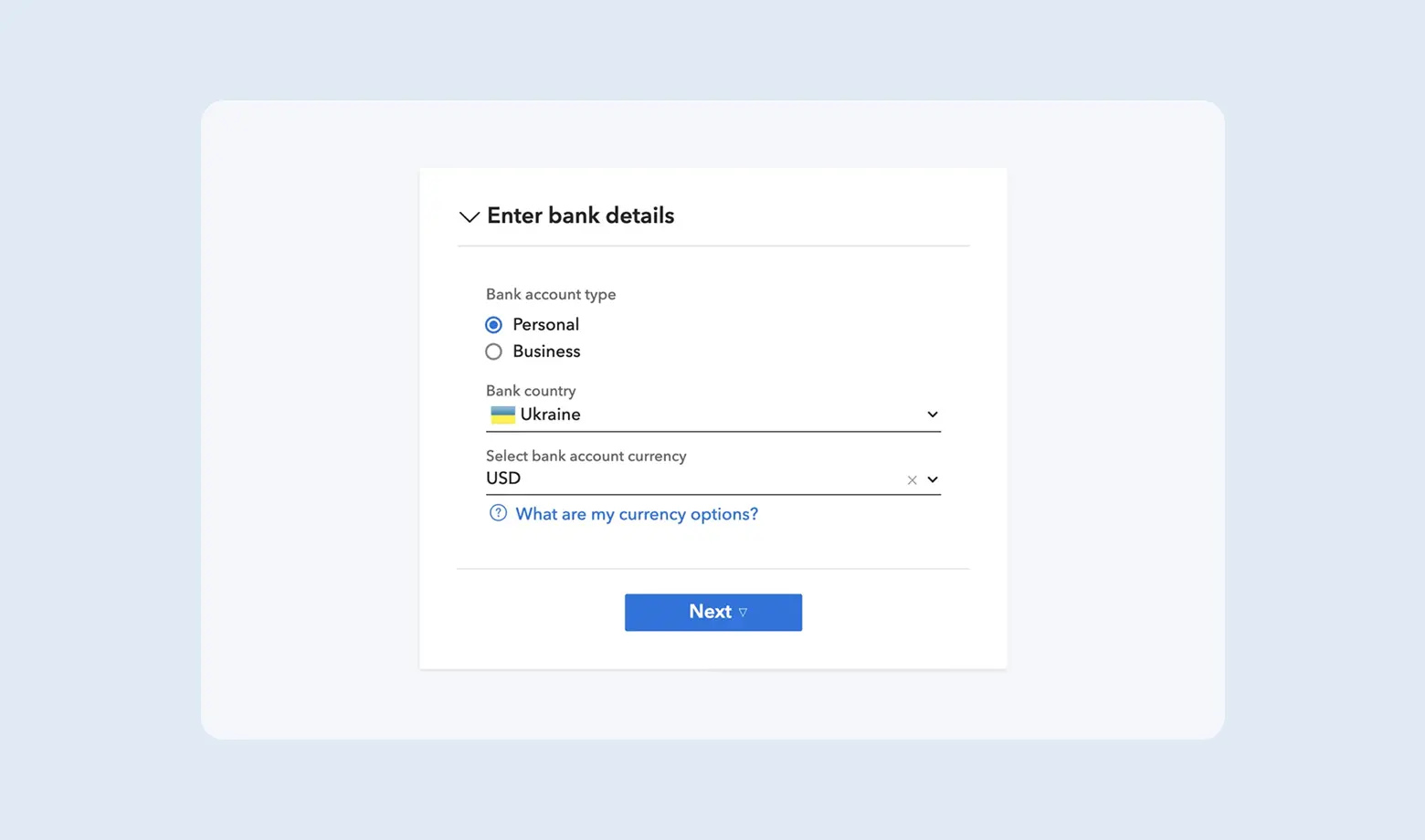
You can add up to three different bank accounts to your Payoneer profile. This takes up to 3 minutes but allows flexible financial management.
Step 1. Go to the "Manage bank accounts" section and click "Add account".
Step 2. Fill in the form:
- Account type (Personal/Business)
- Country and currency
- Select a bank from the list
- Enter the account holder name and IBAN
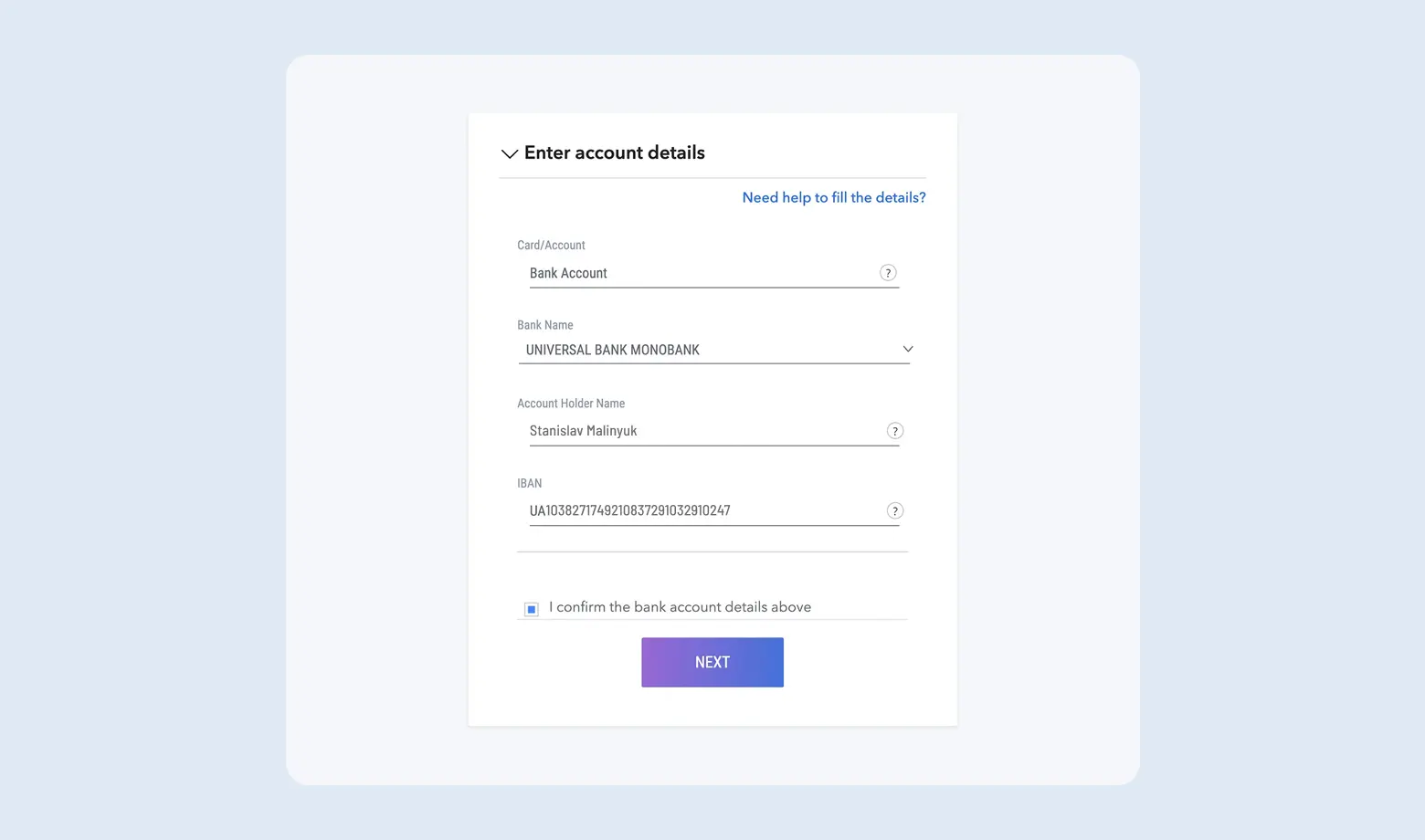
One of the most convenient ways to withdraw money from Payoneer in Ukraine is to use integration with Monobank or PrivatBank. They support direct integration with Payoneer, the fee is a stable 2%, and the money arrives almost instantly. You do not even need to log into the Payoneer website.
If you use other banks (Raiffeisen, OTP, etc.), use withdrawal by bank details. This is the standard way to withdraw money from Payoneer to a bank in Ukraine via IBAN.
- In the "Manage bank accounts" section click "Add account".
- Specify the country, currency, and your IBAN (international bank account number).
- After verification (up to 24 hours), the account will become active.
- Withdraw funds through the "Withdraw" menu. The fee per the global pricing page is 1.2-4%, and the transfer may take from 1 to 3 business days.
Sole proprietor taxes and currency supervision
This is the part payment-service reviews usually skip, and it is exactly where entrepreneurs run into trouble.
When the income arises
Per the tax authority position (ZIR, category 107.01.03) a sole proprietor's income arises on the date the funds are credited in the Payoneer system, not when you move them to Ukraine. The condition usually left uncited reads as follows - the funds have to be transferred to an account at a Ukrainian bank opened for business activity within the reporting period and no later than the annual one. The rate is the NBU rate on the date the income is recognised.
The income ledger has been abolished. Under clause 296.1 of the Tax Code, group 1-2 sole proprietors and group 3 without VAT keep records in free form, reporting income monthly.
What you pay
| Component | Amount | Basis |
|---|---|---|
| Group 3 single tax | 5% of income | clause 293.3 of the Tax Code |
| Military levy | 1% of the same income | clause 16-1 subsection 10 section XX |
| Social contributions for yourself | UAH 1,902.34 per month in 2026 | the exemption remains suspended for 2026 |
| Group 3 threshold for 2026 | UAH 10,091,049 | clause 291.4 of the Tax Code |
| Exceeding the threshold | 15% single tax on the excess | clause 293.4 of the Tax Code |
The group 2 trap. A group 2 sole proprietor may supply services only to single tax payers and individuals. Supplying a service to a non-resident legal entity is grounds for losing the simplified system. A freelancer with foreign clients needs group 3.
And without a sole proprietorship? Then income from a foreign client is taxed as personal income - 18% income tax plus a 5% military levy, declared annually. On top of that, an individual may carry out foreign economic activity only as an entrepreneur (Article 5(2) of the Law on Foreign Economic Activity).
Currency supervision
- The settlement deadline for foreign economic operations is 180 calendar days (clause 14-2 of NBU Resolution No. 18), and it covers services, not only goods.
- The late settlement penalty is 0.3% per day, capped at the outstanding amount (Article 13 of Law No. 2473).
- The threshold is UAH 400,000 (Article 20 of Law No. 361-IX). Below it the settlement deadlines do not apply.
- Foreign trade revenue has to reach an account at a Ukrainian bank - clause 16 of Regulation No. 5 and Article 13(2) of Law No. 2473. Payoneer is an intermediate link, not a substitute for the account.
There is more on an entrepreneur's foreign currency income in our article on a sole proprietor and foreign currency income.
CRS: does the tax office see your Payoneer?
Precision matters here, because it is easy to be wrong in either direction. Payoneer itself officially states that it is not covered by CRS and does not take part in automatic exchange, neither under CRS nor CRS 2.0. That is the service's own statement, dated February 2026.
It does not follow that the tax can be ignored, and here is why.
- The statement is worded broadly, with no reference to a specific group entity. For the US entity it is logical - the US does not participate in CRS. For the European licence the question is open, because Ireland is on the Ukrainian list of reportable jurisdictions.
- Since 01.07.2026 Ukraine applies CRS 2.0, and e-money issuers now fall squarely within the definition of a Depository Institution. The service's status may change.
- The money still lands in a Ukrainian bank, where currency supervision and AML apply with a UAH 400,000 threshold.
- Payoneer responds to targeted requests from tax authorities even if it does not take part in automatic exchange.
And there is a channel that works regardless of CRS. Under clause 39-2.6.3 of the Tax Code, a bank, financial institution, non-bank payment service provider or e-money issuer that discovers a Ukrainian resident holds a share in a foreign legal entity notifies the tax authority within 5 business days. For owners of US companies that is a stronger argument than automatic exchange.
On the exchange mechanism itself, see our article on the CRS agreement and foreign accounts.
FAQ: taxes, CRS and blocked Payoneer accounts in Ukraine
How do I withdraw money from Payoneer in Ukraine to a card?
Through a linked bank account or through the direct integration in the Monobank and Privat24 apps. The fee is 2% for the Monobank integration, 1.5% per PrivatBank and 1.2-4% per the global pricing page for other banks. The transfer takes from a few minutes to 1-3 business days.
Does the tax office see my funds on Payoneer?
Payoneer itself officially states that it is not covered by CRS and does not take part in automatic exchange. That does not make the account invisible. First, since 01.07.2026 Ukraine applies CRS 2.0 and e-money issuers fall within its definition, so the status may change. Second, the money still lands in a Ukrainian bank with currency supervision and AML. Third, under clause 39-2.6.3 of the Tax Code a financial institution that discovers your share in a foreign company notifies the tax authority within 5 business days. There is one workable strategy - declare the income.
What if I have a US company - do the same rules apply?
No. For an account held by a US company the dollar is the local currency, so receiving to USD details is free rather than 1%. In exchange a withdrawal limit appears - the payee name has to match the company name, so moving LLC money to the owner's sole proprietor account directly will not work. Plus two sets of filings: CFC reporting in Ukraine and Form 5472 in the US.
Can I accept a payment from an individual client?
No. A Payoneer receiving account accepts only payments for business transactions from business accounts; payments from personal bank accounts are declined. For such a client use Request a Payment by card, but the fee there is up to 3.99% plus $0.49.
Why does a payment fail on a Ukrainian website?
Two typical reasons. Geoblocking - some Ukrainian services accept payments only from cards issued by Ukrainian banks. And 3D Secure - on older sites SMS confirmation can conflict with international cards. The alternative is to withdraw the amount to Monobank or PrivatBank.
What is the real currency conversion fee?
If you have a dollar card and pay in hryvnia, Payoneer charges up to 3.5% for conversion. Purchases without conversion cost up to 1.8%, and that is a separate rate, not an add-on. To avoid losses, hold a balance in the currency you plan to spend, or withdraw to Ukraine.
Do I have to pay taxes on Payoneer income in Ukraine?
Yes. For a sole proprietor every inflow through Payoneer is income. A group 3 sole proprietor pays 5% single tax, 1% military levy on the same income and social contributions for themselves - UAH 1,902.34 per month in 2026. Income is recognised when credited in Payoneer, not when withdrawn to Ukraine.
How does a sole proprietor withdraw money from Payoneer in Ukraine?
Enter the business account details in the Manage bank accounts section and withdraw through Withdraw. The data in Payoneer must match the account holder details, otherwise the bank may block the payment. The funds received are recorded at the NBU rate on the date they were credited in Payoneer.
How long does a Payoneer withdrawal to a bank take?
From a few minutes to 1-3 business days. Through the Monobank or PrivatBank integration it is usually 15-30 minutes; by IBAN to other banks 1-3 days or longer.
How do I withdraw money from Payoneer with no fee?
Entirely without a fee is not possible, the service charges for transfers. You can minimise costs with direct payouts from marketplaces and freelance platforms, where the fee is sometimes zero, and by not converting currency more than necessary.
Conclusion
Now you know how to withdraw money from Payoneer in Ukraine, what it actually costs and how an account for a Ukrainian sole proprietor differs from one for a US company. Payoneer remains a working bridge for Ukrainian freelancers and a convenient tool for fees from Upwork, Amazon or Patreon.
To keep the work safe and profitable, remember four rules:
- Calculate the fee for your own case. There is no "steady 2%": Monobank is 2%, PrivatBank 1.5%, other banks 1.2-4%, and receiving to USD details on a Ukrainian account is 1%.
- Minimise conversions. Accumulating currency and withdrawing through the direct integration beats paying in hryvnia from a dollar balance.
- Declare income on the date it is credited in Payoneer, not on the date of withdrawal. Regular activity needs group 3; group 2 does not work with foreign clients.
- Watch the foreign trade deadlines. 180 calendar days to settle, a 0.3% daily penalty, and a UAH 400,000 currency supervision threshold.
If you are still choosing a structure, weighing a sole proprietorship against a US company, or already receiving foreign currency and unsure how to account for it, write to us. We will go through your case and set up the accounting so that neither the bank nor the tax office has questions.
Want to consult with a specialist on how to withdraw Payoneer funds to a Ukrainian bank card?
Leave a request and our specialist will contact you shortly