

How to Get a Refund of Overpaid Taxes in Ukraine - Step-by-Step Guide


Sent the tax payment to the wrong tax office? Selected the wrong payment code? Paid the tax twice and now don’t know what to do?
Good news: taxes paid by mistake or in excess can be refunded or transferred to the correct account if you follow the procedure предусмотрed by the Tax Code. But there is a nuance: if you incorrectly submit a refund application for overpaid taxes, you may receive a refusal or even penalties for late fulfillment of the main obligation.
In this article, we will explain how to get a refund of mistakenly paid taxes in 2026 for Sole Proprietors and LLCs, when and who can request a refund, what documents are required, how to submit an application, how long it takes, and what to do if there are delays.
Who can request a refund and when does it apply?
The right to request a refund of mistakenly or excessively paid taxes belongs to everyone - both Sole Proprietors and legal entities. The legal basis is Article 43 of the Tax Code of Ukraine.
Four conditions must be met for the refund to work:
- You submit the application yourself. Nothing is refunded automatically. The exception is overpaid Personal Income Tax based on the annual tax return - in this case, the tax authority performs the recalculation automatically.
- No more than 1095 days have passed since the incorrect payment. This is three years. If you miss the deadline for submitting the application - the money will remain in the budget.
- You do not have any tax debt. If there is a debt - it must be repaid first.
Tip: you can use the overpaid amount for this: submit a transfer request, and the funds will be applied to the debt.
- No sanctions have been applied to you. If the taxpayer, its founders, participants, or ultimate beneficial owners are under sanctions - the tax authority will not return the funds.
But! There are payments to which this procedure does not apply at all. For example, SSC (Unified Social Contribution), VAT refunds, customs payments - they have separate procedures. We will discuss SSC separately in the section on common mistakes.
What should you do immediately after discovering a tax overpayment?
An incorrect payment is not yet a problem. The problem begins when you act incorrectly or do not act at all. The result - penalties for late payment or refusal to refund the money. To ensure the refund goes smoothly, do the following immediately:
Save the payment document - and make a PDF copy. You will definitely need it when filling out the application. A cropped screenshot or a blurry photo taken quickly is not an option, because all numbers must be clearly readable. If the document is lost, you will have to restore it through the bank, which means losing time.
If the tax payment deadline is approaching - pay it correctly. The most common mistake is when a business owner waits for the refund of an incorrect payment and misses the deadline for the main obligation. The result - penalties and fines.
Check if you have any tax debt. If there is one - the refund will be blocked. The tax authority will simply refuse until the debt is repaid. But there is a solution: direct the overpayment to cover the debt. This is legal and does not involve additional costs.
Not sure how to submit the application correctly?
Entrust the refund of overpaid taxes to the team of accountants at buh.ua. We take responsibility for the numbers - you focus on your clients.
Where can the funds be directed?
When submitting the application, you must immediately specify where to direct the mistakenly paid funds. There are four options:
- Transfer to the correct tax. The most popular and fastest option. In practice, it means the funds are immediately credited where needed - without withdrawing to your account and making a new payment. To do this, specify in the application the correct payment details: budget classification code (CBC), tax name, account number, and EDRPOU code.
- Refund to a bank account. That is, the funds are returned to the taxpayer’s IBAN. But there is an important nuance: the money will only be transferred to the account of the person who made the payment. If someone else paid the tax - the funds will be returned to them, not to you.
- To a unified account. If you use a unified account for tax payments - the overpayment can be directed there. But here - be careful! If you accidentally check the “Unified account” option, you will receive an automatic refusal of the refund. You can submit the application again, but you will lose time.
- Cash via the treasury desk. This option exists - but only if you do not have a bank account at all. In practice, almost no one uses it.
The option you choose depends on the situation. If the tax payment deadline is about to expire - choose a refund and make the correct payment immediately. Also choose a refund if the overpayment is large and you need the funds for cash flow. If you noticed the mistake right away and deadlines are not critical - confidently transfer the funds to the correct account.
How to submit an application electronically - step-by-step guide
The application is submitted electronically via the State Tax Service e-Cabinet.
In practice, the most common mistakes - wrong form, incorrect tax authority, or abbreviated tax name - lead to rejection and restart of the review period.
Let’s go step by step on how to submit a tax refund application via the State Tax Service e-Cabinet:
Step 1. Log in and find the required form.
Log in to the system “Taxpayer e-Cabinet”. You can use a QES (qualified electronic signature), MobileID, BankID, or Diia.Signature.
After logging in, go to the “Reporting input” section - this is the private part of the cabinet. Set the filter “J(F)13 Requests” and select the form:
for individuals - F1302002
for legal entities - J1302002
Important: do not confuse the forms. F - individuals, J - legal entities. Submitting the wrong form means automatic rejection.
Step 2. Specify the State Tax Service authority and fill out the form.
After selecting the form, the system will open a window - in the “Tax Office Code” field, specify the territorial State Tax Service authority and click “Create”. This is the office where the overpayment is registered - meaning where the funds actually went, not your place of registration. If you don’t know the code - уточніть у своїй податковій або знайдіть на State Tax Service website. After clicking “Create”, the application form will open for completion.
Registration data will be filled in automatically. You need to enter manually:
- Tax or fee name - only the full name, as listed on the State Tax Service website. Abbreviations like “Single Tax” or “Military Levy” are not accepted - the application will be rejected.
- Amount and payment date - exactly as in the receipt. Even a difference of 1 cent may be grounds for rejection.
- Details from the receipt:
- CBC (budget classification code - 8 digits),
- budget account number,
- EDRPOU code of the Treasury.
All of this is in your payment receipt - transfer it without any changes.
- Refund direction: to a bank account, to the correct tax, to a unified account, or in cash. Specify the transfer details - IBAN or the correct payment details.
You can also attach a copy of the payment document in the “Attachments” tab to the application. This is completely optional, but in practice such applications may be processed faster by the State Tax Service.
Step 3. Check and submit the application.
Click “Check” - the system will notify you if something is filled in incorrectly. Then click “Save”, and the system will store a draft in the “e-Cabinet”. After that, sign the application with a QES and submit it. The system will automatically send it to the required State Tax Service authority. After submission, you will automatically receive Receipt No. 1 confirming acceptance. After review - Receipt No. 2 will appear in the “Incoming/Outgoing documents” section with the result.
If you need to refund funds for multiple payment receipts - submit separate applications for each one. One application = one receipt. You cannot combine them, otherwise you will receive a refusal.
Alternative option - a paper application.
A paper option is possible, but in practice it takes more time and has a higher risk of technical errors. You can submit a paper application to the territorial State Tax Service authority. The application can be in free form, but must include all the same data as in the electronic submission. In this case, we recommend attaching the payment receipt to speed up the review process. You can find the addresses of taxpayer service centers here.
When to expect a refund and what to do in case of delay?
After submitting the application, the official countdown begins. Within 20 calendar days from the submission date, the State Tax Service prepares a conclusion on the refund. No later than 5 working days before the end of this period, the conclusion is transferred to the Treasury - which actually processes the payment. Theoretically, the review period is 30 calendar days, but in practice it is often 2-3 weeks. If the tax authority determines that the refund is not justified - you will receive a refusal.
To calculate the timeline, add 20 calendar days to the application submission date - this is the final date by which the State Tax Service must prepare the conclusion. From this date, count back 5 working days - this is the last day when the conclusion must be sent to the State Treasury Service. It will then return the funds within 5 working days after approval.
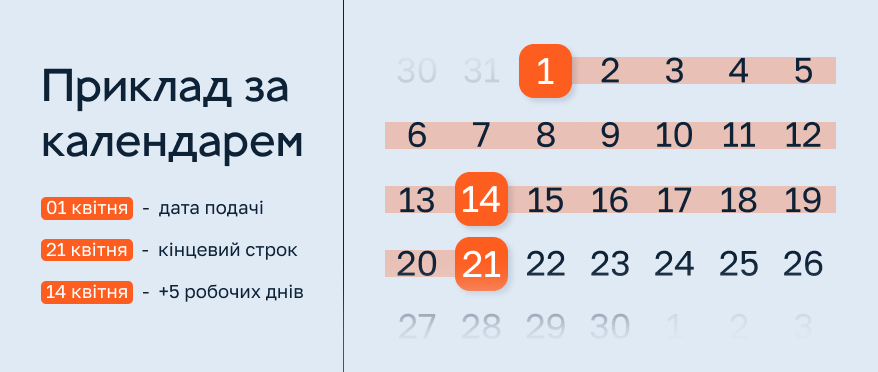
Example: application submitted on April 1. Deadline - April 21. Five working days before April 21 is April 14. Therefore, the conclusion must be sent to the Treasury no later than April 14. Plus 5 working days for the refund - this is April 21.
What to do in case of delay:

First step
check the status in your cabinet. You may have received a refusal that you didn’t notice.
Second step
contact your territorial State Tax Service office with a request about the application status. This can be done via “Correspondence with the State Tax Service” in the e-Cabinet.
Third step
if there is no response or the State Tax Service violates deadlines - file a complaint with a higher authority or seek legal advice.
Important: a long delay on the part of the State Tax Service does not cancel your right to a refund. But trying to “pull out” the money from the system on your own is not easy. If the situation drags on - it is better to involve a specialist.
The process is dragging on and the State Tax Service is silent?
We know what to do next - we will prepare a request, track the status, and help you get your money back.
Common mistakes when refunding mistakenly paid taxes
Most refusals are not due to the complexity of the procedure, but due to simple mistakes. But each of them costs time: at least 2-3 weeks for resubmission. And if the 1095-day period is about to expire - you may not see the money at all.
Mistake 1. Chose the wrong application form. F1302002 - for individuals, J1302002 - for legal entities. It may seem minor - but submitting the wrong form means automatic rejection and restarting the review period. Check the taxpayer type before submitting.
Mistake 2. Combined several payments into one application. The logic is clear - it seems faster. But it does not work. The rule is strict: one application - one receipt. If you combine several overpayments, the application will be returned for revision. Submit separate applications for each payment.
Mistake 3. Incorrect CBC or payment code. An error in the budget classification code is one of the most common reasons for rejection. If the code does not match the data in the State Tax Service registry - the funds will not be identified and the refund will be blocked. Transfer the CBC exactly from the receipt, without changes. In the table below, you can see examples of main CBC codes:
| Budget classification code | Name of the budget classification code | Note |
|---|---|---|
| 11011700 | Military levy payable by sole proprietors under the simplified taxation system | Only for Sole Proprietors on the single tax - do not confuse with the military levy for employees |
| 18050400 | Single tax for individuals | For Sole Proprietors of groups 1, 2, and 3 under the simplified taxation system |
| 11010100 | Personal Income Tax withheld by tax agents from wages | PIT withheld by the employer from employees’ salaries |
*Relevant as of the publication date. Codes may change.
Mistake 4. Submitted to the wrong State Tax Service authority. The application must be submitted to the territorial authority where the overpayment is registered - where the funds actually went. If you submit to the office at your place of registration - you will receive a refusal, and the deadlines will restart. Check the State Tax Service authority in the e-Cabinet.
Mistake 5. Incomplete or incorrect refund details. Missing IBAN, wrong recipient, or incorrect account number - and expect a refusal. The Treasury will not figure out where to transfer the funds. Provide full details and double-check them before submitting.
Mistake 6. Waited for a refund and missed the deadline for paying the correct tax. Entrepreneurs often think like this: there is an incorrect payment, the funds are already in the system, so why pay again? But the application review takes up to 20 working days - and while you wait, the deadline for the main obligation may expire. The result - penalties and fines on top of the existing issue. The rule is simple: if the tax payment deadline is approaching - first pay correctly, then submit the refund application.
Mistake 7. A separate case - SSC. In practice, we often see that this is a common trap. Funds mistakenly paid to the SSC account (account 3556) are not refunded via the standard F/J1302002 form. If you submit a regular application - you will receive an error or refusal and waste time. For SSC - a separate refund application from account 3556 via “Correspondence with the State Tax Service” in the e-Cabinet. For more details on the SSC refund procedure, read the article “How can a Sole Proprietor avoid double SSC taxation?”.
FAQ: most common questions about tax overpayments
I have an overpayment for the previous year - is it still not too late to submit an application?
It depends on the payment date. The law gives 1095 days - that is three years from the date of the incorrect payment. If the deadline has not passed - submit the application. But do not delay: the closer you are to the limit, the higher the risk of rejection due to system-related technical delays. If you are unsure about the dates - check your statement and calculate precisely.
Will I be able to receive a refund if the tax was paid by another person?
Yes, a refund is possible. But there is a nuance: the funds will be transferred to the account of the person who actually made the payment. For example, if your spouse paid - the refund will go to them, not to you. If you need the funds to be transferred specifically to your account - it is better to consult an accountant to choose the correct transfer direction.
Is form F1302002 suitable for the unified social contribution (USC)?
No, because SSC is not a tax. It is an insurance contribution administered under separate rules. The standard F/J1302002 form applies only to taxes and fees. If you submit a regular form for SSC - you will receive a refusal and waste time. For SSC, use a separate form 3556.
I submitted an application, but received an error: “It is necessary to choose a different direction for the transfer of funds.” What does this mean?
This is one of the most common technical errors. There may be several reasons. The first - you are trying to refund funds from the SSC account using the standard form: this does not work, a separate application is required. The second - you selected a transfer direction that does not exist or is unavailable: for example, you chose a “Unified account” that you do not have. The third - an error in the details: incorrect account number, State Tax Service code, or Treasury EDRPOU code. Check each of these points and submit again. If the error persists - consult an accountant: sometimes the reason is not obvious and requires detailed analysis.
Can an overpayment be refunded automatically?
No. A refund is made only upon the taxpayer’s application (except for certain cases of Personal Income Tax recalculation).
Conclusion
Refunding mistakenly paid taxes is possible. But only if you act on time and correctly.
The main thing to remember: you have 1095 days from the date of the incorrect payment. Miss the deadline - the money stays in the budget. If you have tax debt - the refund is blocked. An error in the details or using the wrong application form - means refusal and restarting the review period. And if you waited for the refund and missed the deadline for the main payment - you will also get penalties.
If you discovered an overpayment - save the receipt, check the deadlines, and submit an application via the e-Cabinet. Do not delay: the longer you wait, the less time remains within the allowed period.
If the amount is large, the situation is нестандартна or you have already received a refusal - it is better not to act blindly. A consultation with an accountant will help you prepare the application correctly the first time and avoid wasting time fixing mistakes.
Is the overpayment large or the situation complex?
The buh.ua team will help you get your money back and protect you from mistakes that cost more than a consultation.